Build Your First API
By the end of this page you'll have a working Rails API, backed by Graphiti, that supports filtering, sorting, pagination, and nested relationships out of the box.
We'll use Rails and ActiveRecord here, on familiar ground. For how the pieces fit together, see Lifecycle of a Request.
You'll need Ruby 3.2+ and Rails 7.1+ installed for this walkthrough. Graphiti itself only requires Ruby 3.2+ and ActiveSupport, so you can use it without Rails.
Installation
Let's start with a classic Rails blog. We'll use a template to handle some of the boilerplate. Run this command and accept all the defaults for now:
$ rails new blog --api -m https://raw.githubusercontent.com/graphiti-api/graphiti_rails_template/master/all.rb
Feel free to run git diff if you're interested in the
particulars. This is mostly installing gems and including modules.
Note: if a network issue prevents you from pointing to this URL directly, you can download the file and and run this command as
-m /path/to/template
Alternatively, you can add to an existing project.
Defining a Resource
A Resource defines how to query and persist your Model. In other words: a Model is to the database as Resource is to the API. So first, let's define our Model:
$ bundle exec rails generate model Post title:string upvotes:integer active:boolean
$ bundle exec rails db:migrate
Now we can use the built-in generator to define our Resource, corresponding Endpoint, and Integration Tests.
$ bundle exec rails g graphiti:resource Post title:string upvotes:integer active:boolean
You'll see a number of files created. Now run your app!:
$ bundle exec rails s
Verify http://localhost:3000/api/v1/posts renders JSON correctly.
Now we need data.
Seeding Data
Edit db/seeds.rb to create a few Posts:
Post.create!(title: 'My title', upvotes: 10, active: true)
Post.create!(title: 'Another title', upvotes: 20, active: false)
Post.create!(title: 'OMG! A title', upvotes: 30, active: true)
And run the script:
$ bundle exec rails db:seed
Now load http://localhost:3000/api/v1/posts. You should have 3 Posts in
your database.
Querying
Now that we've defined our Resource and seeded some data, let's see
what query functionality we have. We've listed all Posts at http://localhost:3000/api/v1/posts. Let's see what we can do:
| What you want | URL |
|---|---|
| Sort by title, ascending | /api/v1/posts?sort=title |
| Sort by title, descending | /api/v1/posts?sort=-title |
| Paginate, 2 per page | /api/v1/posts?page[size]=2 |
| Paginate, 2 per page, second page | /api/v1/posts?page[size]=2&page[number]=2 |
Sparse fieldset: only title | /api/v1/posts?fields[posts]=title |
| Filter, simple equality | /api/v1/posts?filter[title]=my title |
| Filter, case-insensitive equality | /api/v1/posts?filter[title][eql]=My title |
| Filter, prefix | /api/v1/posts?filter[title][prefix]=my |
| Filter, suffix | /api/v1/posts?filter[title][suffix]=title |
| Filter, contains | /api/v1/posts?filter[title][match]=itl |
| Filter, greater than | /api/v1/posts?filter[upvotes][gt]=20 |
| Filter, greater than or equal to | /api/v1/posts?filter[upvotes][gte]=20 |
| Filter, less than | /api/v1/posts?filter[upvotes][lt]=20 |
| Filter, less than or equal to | /api/v1/posts?filter[upvotes][lte]=20 |
Filtering on an attribute you haven't made filterable raises Graphiti::Errors::InvalidAttributeAccess. Filtering on one that doesn't exist raises Graphiti::Errors::UnknownAttribute. All filter logic can be customized, and customizations can be packaged into an Adapter for reuse. See Filter.
Extra Fields
Some fields are expensive enough that you only want to compute them when a client asks. Declare those with extra_attribute:
# app/resources/post_resource.rb
extra_attribute :description, :string do
  @object.active? ? 'Active Post' : 'Inactive Post'
end
Request it with /api/v1/posts?extra_fields[posts]=description. You can also eager load data conditionally when the field is requested.
Statistics
Useful for search grids ("the first 10 active posts, plus the total count of all posts") in a single request. Hit /api/v1/posts?stats[total]=count and the result arrives in the meta section of the response:
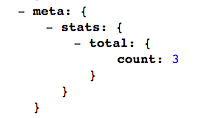
Statistics respect your filters, so the count adjusts accordingly. There are several built-in stats and you can add your own.
Error Handling
Your app always renders a JSONAPI-compliant error response. Raise something in the controller:
# app/controllers/posts_controller.rb
def index
  raise 'foo'
end
and this is what you'd see in production:
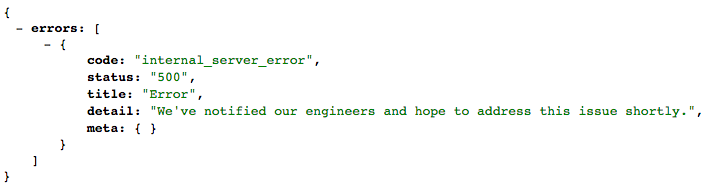
Different errors can be given different response codes, JSON, and side effects. See Error Handling.
Persisting
Resources can Create, Update, and Delete (and you can persist multiple Resources in a single request). The best way to observe this behavior is to take a look at the tests the generator created. One example:
# spec/api/v1/employees/create_spec.rb
subject(:make_request) do
  jsonapi_post "/api/v1/employees", payload
end

describe 'basic create' do
  let(:payload) do
    {
      data: {
        type: 'employees',
        attributes: {
          first_name: 'Jane'
        }
      }
    }
  end

  it 'works' do
    expect(EmployeeResource).to receive(:build).and_call_original
    expect {
      make_request
    }.to change { Employee.count }.by(1)
    expect(response.status).to eq(201)
  end
end
Read more about Persistence and Testing Persistence.
Adding Relationships
Let’s start by defining our Model:
$ bundle exec rails g model Comment post_id:integer body:text active:boolean
$ bundle exec rails db:migrate
# app/models/post.rb
has_many :comments

# app/models/comment.rb
belongs_to :post
...and corresponding Resource object:
$ bundle exec rails g graphiti:resource Comment body:string active:boolean created_at:datetime
Configure the relationship in PostResource:
# app/resources/post_resource.rb
has_many :comments
And allow filtering Comments based on the Post id:
# app/resources/comment_resource.rb
attribute :post_id, :integer, only: [:filterable]
This code:
- Allows eager-loading the relationship.
- URL:
/api/v1/posts?include=comments - SQL:
SELECT * FROM comments WHERE post_id = 123
- URL:
- Generates a Link for lazy-loading.
- Will use
CommentResourcefor querying logic (so we can Deep Query, e.g. "only return the latest 3 active comments"). - By default, this will generate the query
CommentResource.all(filter: { post_id: 123 }), but relationships can be customized
You should now be able to hit /api/v1/comments with all the same
functionality as before. We need to seed data.
Seeding Relationships
Start by clearing out your database:
$ bundle exec rails db:migrate:reset
Replace your db/seeds.rb with this code to persist one Post and three Comments:
comment1 = Comment.new(body: 'comment one', active: true)
comment2 = Comment.new(body: 'comment two', active: false)
comment3 = Comment.new(body: 'comment three', active: true)

Post.create! \
  title: 'My title!',
  active: true,
  comments: [comment1, comment2, comment3]
And run it:
$ bundle exec rails db:seed
Relationship Usage
Now let's fetch a Post and filtered Comments in a single request:
/api/v1/posts?include=comments
Any logic in CommentResource is available to us. Let's sort the comments by created_at descending:
/api/v1/posts?include=comments&sort=-comments.created_at.
Logic from CommentResource is accessible at the /api/v1/comments endpoint, and reusable when eager-loading Comments at /api/v1/posts:
/api/v1/comments?filter[active]=true/api/v1/posts?include=comments&filter[comments.active]=true
This is why Resource objects exist: they provide an interface to reuse code across multiple Endpoints.
Just as we can query a graph of Resources in a single request, we can persist a graph of Resources in a single request. See Sideposting.
Exploring with Vandal
Graphiti ships with Vandal, a UI that introspects your schema for point-and-click data exploration. See the Vandal Guide to try it against this blog.
Next Steps
- Continue with the Tutorial for a deeper walkthrough of customization and relationships.
- Browse the Resources guide for the full capability reference.
- Read the Testing Guide to start testing your API.